
ModelKit Overview
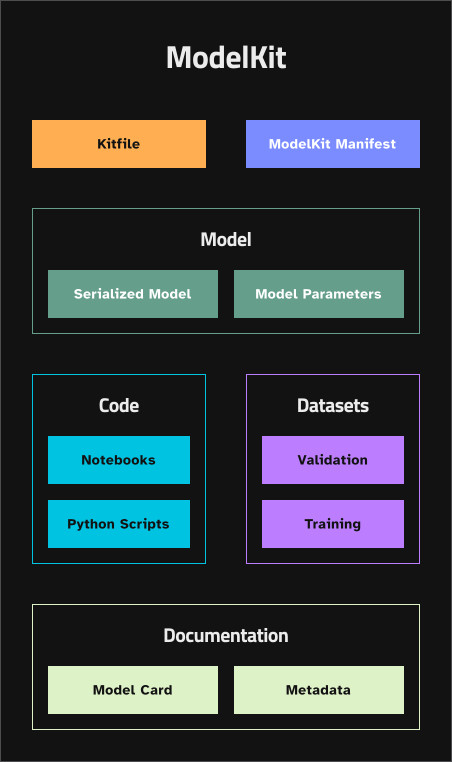
ModelKit is a standardized, OCI-compliant packaging format for AI projects.
It bundles the artifacts your AI project depends on - models, datasets, code, prompts, agent skill files, MCP server configurations, and documentation - into a single versioned, shareable artifact.
Despite the name, not every ModelKit contains a model. A ModelKit can package any combination of AI project artifacts. You might create a ModelKit that contains only prompts and skill files for an agentic AI system, or one that bundles an MCP server with its configuration, or a complete package with model weights, training data, prompts, and code.
Use ModelKits to version, share, and deploy AI projects across teams and environments using familiar DevOps tools like DockerHub, GitHub Packages, or private registries.
➡️ Get started with ModelKits in under 15 minutes ➡️ See how teams use ModelKits
Key Features
OCI-compliant and tool-friendly Store, tag, and version ModelKits in any container registry. No custom infrastructure needed.
Selective unpacking Unpack only the parts you need (e.g. just the prompts, just the model weights, just the MCP config) to speed up pipelines and reduce overhead.
No duplication for shared assets Reuse datasets, prompts, or configs across multiple kits without bloating storage.
Familiar versioning and tagging Use registry-native tags (e.g.
:latest,:prod,:rollback) to track project state and history.Built for AI workflows Supports models, datasets, prompts, agent skill files, MCP server configurations, and code. Handles both large binary files (model weights) and small text files (prompts, configs) in the same artifact.
Streamlined collaboration Teams can pull, inspect, and repack ModelKits just like container images, making it easier to collaborate across roles and environments.
Why It Matters
ModelKit simplifies the messy handoff between data scientists, AI engineers, agent developers, and operations. It gives teams a common, versioned package that works across clouds, registries, and deployment setups without reinventing storage or delivery.
For self-hosted model teams, it’s the packaging layer that ties model weights to their training data, configuration, and documentation. For agentic AI teams, it’s the versioning system that ties prompts, skills, and MCP configs to a known-good state. For teams doing both, it’s one format that covers everything.
ModelPack Format Support
KitOps supports both ModelKit and ModelPack artifact formats:
- ModelKit (default) — KitOps' native format with integrated Kitfile configuration
- ModelPack — The CNCF model-spec format for vendor-neutral AI/ML interchange
Using ModelPack Format
To pack artifacts in ModelPack format, use the --use-model-pack flag:
kit pack . --use-model-pack -t registry/repo:tagCompatibility
All Kit CLI commands work transparently with both formats:
kit pull— Works with ModelKit and ModelPack artifactskit unpack— Extracts contents from either formatkit inspect— Shows manifests for both typeskit list— Displays artifacts regardless of formatkit push— Pushes any supported artifact type
When you pack with --use-model-pack, your Kitfile is preserved as a manifest annotation, ensuring you can still retrieve and use it with Kit commands.
Note: ModelPack artifacts created by other tools (not Kit) may not include a Kitfile. Kit can still unpack these artifacts if they use the org.cncf.model.filepath annotation to specify file paths.
Have feedback or questions? Open an issue on GitHub or join us on Discord.